Revopoint MetroX 3D Scanner Review In 2026
3D scanning has steadily transitioned from a niche industrial process into a creative and technical tool accessible to small studios, designers, and makers.
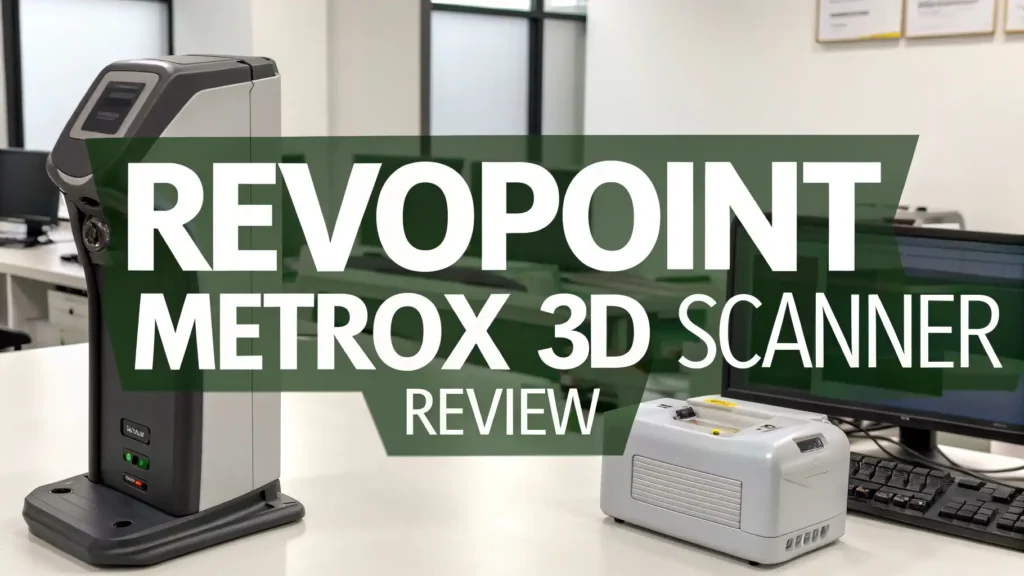
The Revopoint MetroX 3D Scanner stands at the center of this shift, offering remarkable precision at a price that once seemed impossible for blue laser technology.
This review explores how Revopoint has managed to build a scanner that balances affordability, accuracy, and usability—all within reach of creators and engineers alike.
Key Takeaways
- The Revopoint MetroX introduces blue laser scanning technology at a sub-$1,200 price point, enabling professional-grade accuracy for small businesses and creators.
- Offers an accuracy of up to 0.03mm and supports object sizes between 10mm and 1000mm, accommodating a wide variety of scanning tasks.
- Four distinct scanning modes—Cross Lines, Full Field Structured Light, Auto Turntable, and Feature Scan—adapt to different materials and object complexities.
- The dual-axis turntable automates object movement for seamless 360-degree scans and supports color texture capture for photorealistic results.
- Revo Scan 5 MetroX Edition software simplifies the scanning workflow with GPU acceleration, real-time feedback, and one-click post-processing.
- Performs exceptionally on metallic, dark, and textured objects, though reflective or glossy materials may require scanning spray.
- Ideal for engineering, product design, quality control, and digital archiving where precision and repeatability are essential.
- Demands a computer with strong specifications—at least an Intel i7 or Ryzen 7 CPU, 16GB RAM, and dedicated GPU—for best performance.
- The MetroX Advanced Edition includes a comprehensive marker block kit, enhancing tracking reliability for complex shapes.
- A strong mid-tier choice positioned between budget scanners and high-end industrial systems, offering exceptional cost-to-performance value.

What Makes the Revopoint MetroX Worth Your Attention
The Revopoint MetroX brings professional scanning capabilities to your workspace. This device uses blue laser technology combined with structured light scanning to capture objects with impressive detail. You can scan parts from 10mm up to 1000mm in size, covering most everyday projects.
Blue laser scanning was once limited to expensive industrial equipment. Now you can access this technology for under $1,200. The scanner captures up to 800,000 points per second in laser mode and 1,500,000 points per second in structured light mode. These speeds translate to faster project completion and less time waiting for scans to finish.
The device works indoors only and requires connection to a computer. You cannot use it outdoors like some portable models. However, this stationary design provides stability that improves scan quality. The scanner sits comfortably on your desk or workbench, ready whenever you need it.
Four distinct scanning modes give you flexibility for different materials and object types. You can handle metallic surfaces, dark objects, and intricate details. The marker scan modes work best for precision work while feature scan modes handle objects with distinctive textures.
Understanding the MetroX Specifications and Features
The scanner achieves single frame accuracy up to 0.03mm with precision reaching 0.01mm. Volumetric accuracy measures 0.03mm plus 0.1mm per meter of scanning distance. These numbers mean you can capture fine details accurately for engineering applications, jewelry design, or quality control tasks.
Your working distance stays between 200mm and 400mm from the object. This range works well for desktop scanning without requiring excessive space. The single capture area ranges from 160 x 70mm at close distance to much larger areas at maximum distance.
The scanner outputs files in multiple formats including PLY, OBJ, STL, ASC, 3MF, GLTF, and FBX. You can import these directly into CAD software, 3D printing slicers, or game engines. The versatility ensures compatibility with your existing workflow regardless of your industry.
Scanning technology has evolved rapidly in recent years. The MetroX represents this progress by offering features that once cost ten times more. Small businesses and independent creators now access tools previously reserved for large corporations with massive budgets.
How the Multiple Scanning Modes Expand Your Capabilities
Cross Lines Mode delivers the highest precision for engineering applications. This mode uses multiple laser lines to capture metallic and shiny surfaces without spray coating. You can scan mechanical parts, tools, and reflective objects directly. The mode works best with marker placement for tracking during handheld scanning.
Full Field Structured Light Mode captures larger areas quickly. This mode projects patterns onto objects and analyzes the distortions to build 3D models. The capture speed increases significantly compared to laser line scanning, making it ideal for objects with good surface features and texture.
Auto Turntable Mode simplifies scanning by automating object rotation. You place items on the included dual axis turntable, and the scanner captures multiple angles automatically. This mode also enables color texture scanning, preserving the original appearance of objects for photorealistic models.
Feature Scan Mode works without markers by tracking natural object characteristics. This option speeds up workflow when scanning items with sufficient detail and texture. Objects with flat surfaces or repetitive patterns may struggle in this mode, requiring marker assistance instead.
The Dual Axis Turntable Transforms Scanning Workflow
The included turntable rotates objects both horizontally and vertically. You set angles and sequences through Bluetooth connection to your computer. The device can also operate standalone using its built in controls and display screen.
Automated positioning ensures consistent coverage of all object surfaces. The turntable pauses at programmed intervals while the scanner captures data. You achieve complete 360 degree scans without manual repositioning or missing sections.
The turntable supports objects up to specific weight limits. Larger items require creative positioning or switching to handheld scanning modes. The flat plate surface includes marker points and reference patterns that improve tracking accuracy during automated scans.
Scanning small objects becomes significantly easier with turntable automation. You avoid the tedious process of manually rotating items while maintaining scanner position. The result is cleaner data with fewer alignment errors during post processing.
Software Experience with Revo Scan 5 MetroX Edition
Revopoint provides dedicated software designed specifically for MetroX operation. Revo Scan 5 MetroX Edition guides you through scanning with clear visual feedback. The interface shows scanner position, captured data in real time, and alerts when tracking issues occur.
GPU acceleration increases scanning speed up to 60 frames per second on Windows systems. This improvement makes scanning smoother and reduces frustrating lag during capture. Mac users can still use the software but may experience slower processing speeds.
The one click edit function automates common cleaning tasks. The software removes marker points, fills small holes, and smooths surfaces with minimal manual intervention. You can also access advanced editing tools for precise control when automatic processing leaves imperfections.
Fusion settings combine multiple scan passes into single models. You control point density, alignment accuracy, and overlap handling. The software handles complex merges when scanning objects from multiple angles or combining separate components.
Top 3 Alternative for Revopoint MetroX 3D Scanner


Performance Testing Results Across Different Materials
Metallic objects scan exceptionally well in Cross Lines Mode without surface preparation. Knife handles, mechanical components, and tools capture with engineering grade accuracy. The blue laser technology handles reflective surfaces that defeat many budget scanners.
Black objects also perform well despite their light absorbing properties. The advanced sensors compensate for low reflectivity. However, extremely dark or completely black items may benefit from light scanning spray application for optimal results.
Textured surfaces like woven baskets and carved wood provide excellent scan results. Natural features give the scanner tracking points for alignment. Color capture in turntable mode preserves original appearance, creating models suitable for virtual reality or product visualization.
Shiny glossy surfaces present the biggest challenge. Mirror like finishes or chrome plating can confuse the scanner sensors. Scanning spray becomes necessary for these materials, adding preparation time to your workflow. The spray washes off easily after scanning completes.
Computer Requirements Impact Your Scanning Experience
The MetroX demands substantial computing power for optimal performance. Windows users need Intel i7 10th generation or AMD Ryzen 7 5800 processors minimum. Mac users require M1 Pro or better chips. Both platforms need at least 16GB RAM, though 32GB improves stability.
Graphics card acceleration helps processing speed significantly. NVIDIA GeForce RTX 3050 with 8GB memory provides good performance. Integrated graphics work but expect longer processing times and potential stability issues during complex operations.
Underpowered computers struggle with large scan files. You may need to reduce point counts before mesh generation or avoid one click processing. Breaking scans into smaller sections helps manage resource limitations but increases overall workflow complexity.
Storage space fills quickly with high resolution scans. A single detailed object can generate gigabytes of data before optimization. Ensure adequate SSD space for temporary files during processing and permanent storage for your project library.
Practical Applications Across Industries
Reverse engineering benefits greatly from the MetroX precision. You can measure existing parts accurately and create CAD models for reproduction or modification. Automotive restoration projects use scans to fabricate discontinued components or create custom modifications.
Product design studios use the scanner for prototyping workflows. Physical clay models or mock ups get digitized for refinement in CAD software. The process combines traditional sculpting advantages with digital editing flexibility, accelerating development cycles.
Quality control departments verify manufactured parts against specifications. The scanner detects dimensional variations, surface defects, and assembly issues. Manufacturing facilities integrate scanning into inspection protocols for critical components requiring tight tolerances.
Artists and content creators preserve sculptures and artifacts digitally. Museums document historical objects for archives and virtual exhibits. Game developers scan real world items for texture references and asset creation, improving visual authenticity.
Understanding the Learning Curve and Setup Time
Initial calibration requires patience and steady hands. The scanner weighs enough that holding it stable during calibration tires your arms. Follow the software instructions carefully to achieve proper calibration, as this affects all subsequent scanning accuracy.
Marker placement strategy impacts scan success significantly. Too few markers cause tracking loss, while excessive markers create cleanup work later. Learning optimal marker spacing and positioning takes practice across different object types and sizes.
The software provides helpful guidance but assumes some technical knowledge. Newcomers face a learning period understanding scanning modes, processing settings, and workflow optimization. Online resources and community forums help troubleshoot common issues and share best practices.
Your first scans will likely require multiple attempts before achieving satisfactory results. This normal learning process teaches you how scanner movement, lighting conditions, and object positioning affect outcomes. Persistence pays off with increasingly better results as your skills develop.
Price Comparison and Value Analysis
The MetroX Advanced Edition retails around $1,199 with the complete marker block kit. The Standard Edition costs approximately $899 without the advanced marker accessories. This pricing positions the scanner between entry level consumer devices and true industrial equipment.
Budget alternatives like the Creality CR Scan Ferret Pro start around $359 but lack the precision and features of the MetroX. Mid range competitors like the Shining 3D Einstar cost $699 but offer different capability tradeoffs worth considering for your specific needs.
Professional grade scanners from established industrial brands start at $5,000 and climb into tens of thousands. The MetroX delivers comparable accuracy for specific applications at a fraction of this cost. The value proposition becomes compelling for small businesses and professionals requiring precision without enterprise budgets.
Additional costs include the optional scanning spray, extra markers, and potentially computer upgrades. Budget these accessories when calculating total investment. The overall package still represents excellent value compared to professional alternatives or outsourcing scanning services.
Accessories That Enhance Scanner Performance
The marker block kit included with Advanced Edition improves scanning efficiency dramatically. Ball markers, dome markers, pyramid markers, and bar markers provide options for different surface types. The variety ensures proper tracking on challenging objects.
Scanning spray becomes essential for problematic surfaces. The sublimating coating creates a uniform matte finish that improves laser and light pattern detection. One can covers multiple projects, and the coating evaporates completely within hours without cleaning.
A sturdy tripod or mounting arm stabilizes the scanner during fixed position work. While handheld scanning offers flexibility, stationary mounting reduces fatigue and improves consistency. Various mounting solutions accommodate different workspace configurations and project requirements.
The included carrying case protects your investment during transport and storage. The metal construction withstands impacts while foam inserts cushion the scanner and accessories. Organization compartments keep cables, markers, and calibration boards accessible and protected.
Real World Scanning Speed and Efficiency
Actual scanning time varies dramatically based on object complexity and chosen mode. Simple objects with good features might scan in minutes. Complex items with problematic surfaces or requiring high detail can take considerably longer with multiple passes needed.
Processing time often exceeds scanning time significantly. Your computer works hard converting raw point cloud data into usable meshes. Large scans with millions of points may require hours to process completely, especially on minimum specification computers.
The pause and check feature proves invaluable for time management. You can verify scan progress before investing more time in unsuccessful attempts. This capability prevents wasting effort on scans that won’t align properly or capture required details.
Workflow optimization develops through experience. You learn which modes work best for specific materials, optimal marker strategies, and efficient processing settings. Your effective scanning speed improves substantially as expertise grows and mistakes decrease.
Comparing MetroX to Other Revopoint Products
The POP 3 scanner offers portability and lower cost around $526 but sacrifices precision. That model suits medium sized objects and less demanding applications. The MetroX targets users requiring engineering grade accuracy for technical applications.
MIRACO Plus brings standalone operation with built in processing at $1,529. This model includes photogrammetry for large object scanning and operates without computer connection. The additional cost buys convenience and outdoor capability that MetroX lacks.
Each Revopoint scanner serves different needs and budgets. The MetroX occupies the precision focused niche, sacrificing portability for accuracy. Understanding your priority between precision, convenience, and cost guides the right choice for your situation.
Revopoint continues expanding their lineup with specialized solutions. Following their product announcements helps identify when new models better match your evolving needs or offer improved technology at similar price points.
Common Challenges and Solutions
Lost tracking messages interrupt scans when the system cannot follow object position. This occurs with insufficient markers, repetitive surfaces, or excessive scanning speed. Solution involves adding markers, slowing movement, or switching to marker based modes.
Large objects exceeding turntable capacity require creative approaches. You can scan sections separately and merge them, use handheld mode exclusively, or position objects strategically to capture maximum area per pass. Each approach demands different skills and patience levels.
Software crashes or freezes plague underpowered computers during processing. Reducing point counts before mesh generation helps, as does closing other applications during intensive operations. Upgrading RAM or using a more powerful computer ultimately provides the best solution.
Texture mapping misalignment frustrates color scanning efforts. Proper calibration usually resolves these issues. Running calibration specifically for color mode before important projects ensures best results and prevents disappointment after time intensive scanning sessions.
Frequently Asked Questions
What is the difference between MetroX Advanced and Standard editions?
The Advanced Edition includes the comprehensive Marker Block Kit with dome markers, pyramid markers, ball markers, and bar markers. This kit significantly improves scanning efficiency for challenging objects. The Standard Edition includes basic markers only. Both versions contain the dual axis turntable, calibration board, carrying case, and necessary cables. The scanning hardware and software capabilities remain identical between editions.
Can the MetroX scan objects without using scanning spray?
Yes, the MetroX excels at scanning many materials without spray. The blue laser technology handles metallic surfaces, textured objects, and moderately dark items directly. Scanning spray becomes necessary only for extremely reflective surfaces like chrome, very dark black objects, or transparent materials. This capability distinguishes the MetroX from many competitors requiring spray for common materials.
What size objects can I realistically scan with the MetroX?
The minimum scanning volume measures 10 x 10 x 10mm for tiny objects. Maximum volume reaches 1 x 1 x 1 meter for larger items. The practical working distance of 200 to 400mm means you scan medium sized objects most comfortably. Very large items require multiple scan passes and merging. Very small objects need steady hands or turntable mounting for best results.
Does the scanner work with Mac computers?
Yes, Revo Scan 5 MetroX Edition supports macOS 11.0 or newer. However, Mac users need M1 Pro, Max, or Ultra chips for adequate performance. The Windows version currently offers better GPU acceleration and faster processing speeds. Mac support continues improving with software updates, but Windows users currently experience smoother operation overall.
How does the MetroX compare to smartphone based scanning apps?
The MetroX provides vastly superior accuracy and detail compared to smartphone photogrammetry apps. Phone apps work well for basic models and casual use but cannot match dedicated scanner precision. The MetroX achieves 0.03mm accuracy versus several millimeters typical from phone scanning. For professional applications requiring dimensional accuracy, the MetroX clearly outperforms phone based solutions.
Can I export scans directly to CAD software for engineering work?
Yes, the MetroX exports files in formats compatible with major CAD platforms. STL files import into SolidWorks, Fusion 360, AutoCAD, and similar programs. You may need to perform mesh to solid conversion within your CAD software. Some applications require additional plugins or steps for optimal mesh handling, but basic import functionality works across industry standard platforms.
What is the expected lifespan and durability of the MetroX?
The scanner features industrial grade construction designed for regular professional use. The blue laser and sensors have long operational lifespans with proper care. The main risks come from physical damage during transport or accidental drops. Using the included carrying case and handling the device carefully ensures years of reliable service. Revopoint provides warranty coverage for manufacturing defects.