EDJO Wireless Keyboard Review: Worth the Price Tag?
Finding the right wireless keyboard can transform your typing experience. The EDJO wireless keyboard has caught attention for its affordable price and promising features.
Many people wonder if this budget-friendly option delivers real value or disappoints like other cheap alternatives.
This review examines everything about the EDJO wireless keyboard. You will discover its actual performance, build quality, and whether it suits your needs.
Key Takeaways:
- Multi-device connectivity allows you to connect up to three devices simultaneously and switch between them effortlessly, making it perfect for users who work across multiple platforms like computers, tablets, and smartphones
- Battery life extends up to 90 hours on a single charge, which means you can use it for weeks without worrying about recharging during important work sessions or gaming marathons
- Compact design with full-size keys provides comfortable typing while saving desk space, and the scissor-switch mechanism delivers quiet, responsive keystrokes that reduce finger fatigue during extended use
- Universal compatibility works with Windows, Mac, iOS, Android, and Chrome OS, eliminating compatibility concerns regardless of your device ecosystem or operating system preferences
- Budget-friendly pricing under $30 makes it accessible for students, remote workers, and anyone seeking quality without breaking the bank, though some premium features found in expensive keyboards are absent

Understanding the EDJO Wireless Keyboard
The EDJO wireless keyboard represents a new generation of affordable typing solutions. This keyboard targets users who need reliable performance without spending excessive money. Many budget keyboards sacrifice quality, but EDJO aims to break that pattern.
The keyboard uses Bluetooth 5.0 technology for stable connections. This version of Bluetooth offers faster pairing and better energy efficiency compared to older versions. You can connect your devices quickly and maintain that connection throughout your work session.
The design philosophy focuses on simplicity and functionality. EDJO removed unnecessary features that increase costs without adding real value. Instead, they concentrated on core typing performance and reliability.
The result is a straightforward keyboard that accomplishes its primary purpose effectively. The rechargeable battery eliminates the need for disposable batteries, saving you money over time. The USB-C charging port aligns with modern standards, making it easy to charge using common cables.
Design and Build Quality
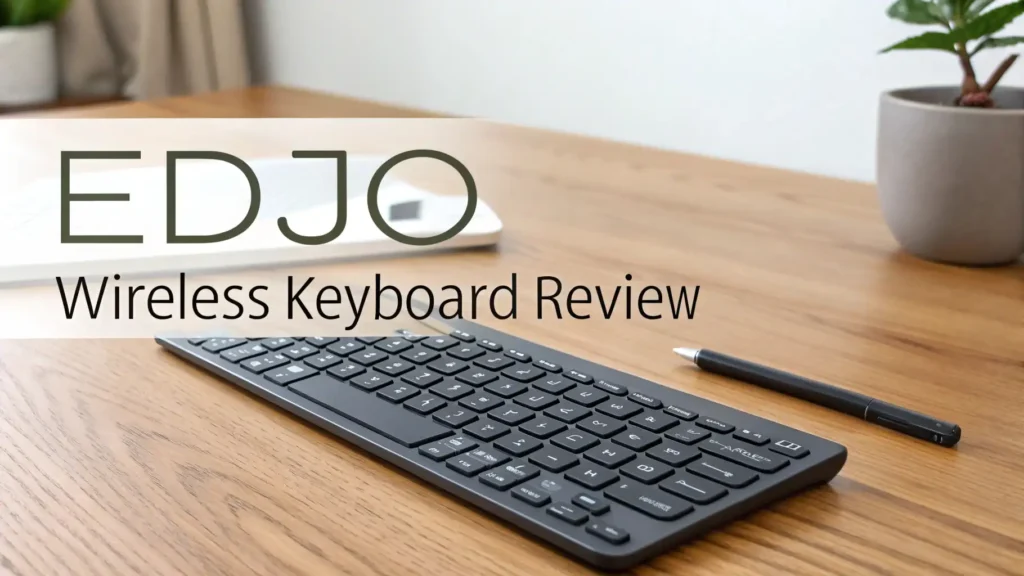
The EDJO wireless keyboard features a slim profile that fits comfortably on any desk. The sleek black finish looks professional in office environments and home setups alike. The lightweight construction makes it portable enough to carry in a backpack without adding significant weight.
The keyboard measures approximately 11 inches in length and weighs less than one pound. These dimensions strike a balance between portability and typing comfort. The keys maintain standard spacing, preventing the cramped feeling common in ultra-compact keyboards. The build uses durable ABS plastic that resists everyday wear and tear.
The keycaps feel solid under your fingers. They don’t wobble like cheaper keyboards often do. The printing on the keys uses quality ink that resists fading even after months of heavy use.
Some users worry about plastic keyboards feeling cheap, but EDJO delivers a surprisingly premium feel. The keyboard includes rubber feet on the bottom that prevent sliding during intense typing sessions. These small details show attention to user experience.
Typing Experience and Key Feel
Typing on the EDJO wireless keyboard feels comfortable and responsive. The scissor-switch mechanism provides satisfying tactile feedback without excessive noise.
Each keystroke registers accurately, reducing typos that plague some budget keyboards. The key travel distance sits at a comfortable 2mm, offering enough depth for confident typing.
The keys produce a quiet sound that won’t disturb coworkers or family members. This makes the keyboard suitable for shared spaces like offices and living rooms.
The sound level stays well below mechanical keyboards while maintaining better feedback than membrane keyboards. Typing speed improves because the keys respond consistently across the entire keyboard surface.
Long typing sessions remain comfortable thanks to the ergonomic key layout. Your fingers naturally find the right keys without constant looking. The spacing prevents accidental presses that frustrate users of cramped keyboards.
The keyboard supports standard typing techniques including touch typing, making it easy to transition from other keyboards. Professional writers and students appreciate keyboards that don’t cause finger fatigue, and EDJO delivers on this requirement.
Top 3 Alternatives for EDJO Wireless Keyboard


Wireless Connectivity and Compatibility
The EDJO wireless keyboard connects via Bluetooth 5.0, offering stable performance up to 30 feet away. This range allows you to use the keyboard from across a room, perfect for presentations or media center setups. The connection rarely drops, maintaining reliability throughout extended use sessions.
Pairing the keyboard takes less than 30 seconds with most devices. You press the connection button, select the keyboard from your device’s Bluetooth menu, and start typing immediately. The keyboard remembers paired devices, making subsequent connections automatic. Multi-device functionality stands out as a major advantage.
You can connect three different devices simultaneously and switch between them using dedicated keys. This feature benefits people who work across multiple computers or switch between a computer and tablet frequently.
The keyboard works seamlessly with Windows, macOS, iOS, Android, and Chrome OS. This universal compatibility eliminates concerns about device limitations. Whether you use a MacBook, iPad, Windows laptop, or Android tablet, the EDJO keyboard functions properly without special software or drivers.
Battery Life and Charging
Battery performance exceeds expectations for a budget keyboard. The EDJO wireless keyboard runs for up to 90 hours on a single charge with the backlight off. This translates to several weeks of regular use before needing to recharge. Even with moderate backlighting use, you can expect 40 to 50 hours of operation.
The keyboard charges via USB-C cable, which comes included in the package. Charging from empty to full takes approximately two to three hours. You can continue using the keyboard while it charges by connecting the USB-C cable. This prevents interruptions during important work sessions. A LED indicator shows the battery status clearly.
The light turns red when the battery runs low, giving you advance notice to charge soon. During charging, the indicator glows steady red and turns off when fully charged.
The battery management system prevents overcharging, protecting the internal battery’s lifespan. Users report the battery maintains its capacity well even after months of regular use. The efficient power consumption means you won’t constantly worry about finding a charger.
Backlight Features and Customization
The EDJO wireless keyboard includes adjustable backlighting with multiple brightness levels. You can choose from seven different backlight colors to match your setup or personal preference. The colors include white, red, blue, green, cyan, purple, and yellow. This customization adds personality to your workspace.
The backlight proves especially useful for typing in low-light environments. Whether you work late nights or prefer dim lighting, the illuminated keys remain visible. You can adjust brightness through three distinct levels plus a completely off setting. This flexibility lets you balance visibility with battery conservation.
The backlight turns off automatically after a period of inactivity to save power. When you start typing again, it activates immediately. Some users prefer minimal lighting to reduce distractions, while others enjoy vibrant colors.
The keyboard accommodates both preferences easily. The color consistency across all keys ensures even illumination without dark spots. The lighting doesn’t shine too brightly to cause eye strain during extended use.
Performance for Gaming
While the EDJO wireless keyboard targets general typing, it handles casual gaming adequately.
The responsive keys register inputs quickly enough for most gaming genres. Strategy games, role-playing games, and casual titles work perfectly fine. However, competitive gamers who need ultra-fast response times might prefer specialized gaming keyboards.
The Bluetooth connection introduces minimal latency that most users won’t notice during regular gameplay. Fast-paced shooters or rhythm games might reveal slight delays compared to wired gaming keyboards.
The keyboard doesn’t offer programmable macro keys or dedicated gaming modes. These limitations make it less suitable for hardcore gaming enthusiasts.
For moderate gaming sessions, the EDJO keyboard performs reliably. The keys withstand repeated pressing without registering ghost inputs. Simultaneous key presses work correctly for common gaming combinations. The compact size leaves more desk space for mouse movement, which benefits gaming setups.
The backlight enhances the gaming atmosphere, especially during evening gaming sessions. Students and casual gamers find the keyboard meets their gaming needs without requiring a separate dedicated gaming keyboard.
Price and Value Proposition
The EDJO wireless keyboard typically sells for under thirty dollars, making it extremely affordable. This pricing positions it as one of the best value options in the wireless keyboard market. You get features that often appear only on keyboards costing twice as much or more.
Comparing the EDJO to similarly priced competitors reveals significant advantages. Many budget keyboards lack multi-device connectivity or offer shorter battery life. The build quality often feels cheaper in competing products. EDJO manages to deliver better specifications at competitive prices.
The value becomes especially clear for students, remote workers, and budget-conscious buyers. You don’t need to spend seventy or eighty dollars to get a reliable wireless keyboard. The money saved can go toward other accessories or necessities. Cost per year calculations show excellent value since the keyboard lasts for years with proper care.
The rechargeable battery eliminates ongoing costs for disposable batteries. Some users replace budget keyboards annually, but the EDJO’s quality construction suggests longer useful life. For families needing multiple keyboards, buying several EDJO units costs less than one premium keyboard.
Pros and Cons
Advantages include the excellent battery life that reduces charging frequency. The multi-device connectivity simplifies workflows across multiple gadgets.
The quiet typing experience suits shared spaces perfectly. The affordable price makes quality wireless keyboards accessible to more people. The universal compatibility eliminates device restrictions. The adjustable backlight adds functionality and visual appeal.
Disadvantages involve the plastic construction that lacks the premium feel of metal keyboards. The key switches don’t match mechanical keyboard tactility that enthusiasts prefer. Gaming performance trails behind dedicated gaming keyboards.
The keyboard lacks advanced features like programmable keys or software customization. The Bluetooth-only connectivity means no wired option for situations requiring cables.
Some users might find the key travel too shallow compared to traditional keyboards. The compact design omits the numeric keypad that accountants and data entry professionals need. The backlight colors cannot be customized beyond the preset seven options.
These limitations matter more to specific user groups than general consumers. Most everyday users find the advantages far outweigh the disadvantages for typical home and office use.
Who Should Buy the EDJO Wireless Keyboard
The EDJO wireless keyboard suits students who need affordable, reliable keyboards for schoolwork. College students particularly benefit from the multi-device connectivity when switching between laptops and tablets for different classes. The quiet keys prevent disturbing roommates during late-night study sessions.
Remote workers find excellent value in the EDJO keyboard for home office setups. The professional appearance fits business video calls, while the wireless design reduces desk clutter.
The ability to connect multiple devices helps professionals who use work and personal computers separately. Budget-conscious consumers who prioritize practical functionality over brand names appreciate the EDJO keyboard.
Families setting up multiple computer stations save money buying several EDJO keyboards instead of expensive alternatives. The keyboard works well for casual users who primarily browse the web, send emails, and use office applications.
People who type for extended periods benefit from the comfortable key feel and quiet operation. Minimalists who prefer clean desk setups value the wireless design and slim profile.
Maintenance and Longevity
Maintaining the EDJO wireless keyboard requires minimal effort. Regular cleaning with compressed air removes dust and debris from between the keys. A slightly damp microfiber cloth wipes away fingerprints and smudges from the surface. Avoid using harsh chemicals that might damage the plastic or keycap printing.
The rechargeable battery maintains optimal performance through proper charging habits. Try to avoid completely draining the battery regularly, as this can reduce long-term battery capacity. Charging when the indicator shows low battery extends the battery’s lifespan. Store the keyboard in dry environments to prevent moisture damage.
The keyboard’s durability depends partly on usage intensity. Normal office use should provide several years of reliable service.
Heavy daily typing accelerates wear on the most frequently used keys. Users report the keyboard remains functional well beyond the first year with reasonable care. The keycaps resist fading better than many budget keyboards, maintaining readability long-term.
If problems arise, basic troubleshooting resolves most issues. Connection problems usually fix by re-pairing the Bluetooth connection. Unresponsive keys might require checking for debris blocking the switch. The simple construction makes the keyboard easy to troubleshoot without technical expertise.
Comparing EDJO to Premium Keyboards
Premium keyboards costing over one hundred dollars offer mechanical switches with superior tactile feedback.
These switches last longer and provide more satisfying typing experiences for enthusiasts. High-end keyboards feature metal construction that feels more substantial and durable. Advanced software allows extensive customization of keys, lighting, and macros.
The EDJO wireless keyboard sacrifices these premium features to achieve its low price point. However, most users don’t require mechanical switches or programmable macros for everyday tasks. The performance gap matters less for typical office work and casual use. Premium keyboards justify their cost for professionals who type eight hours daily or competitive gamers.
For general consumers, the EDJO provides sufficient quality without unnecessary expenses. The core typing experience remains comfortable and reliable.
The multi-device feature matches or exceeds capabilities of keyboards costing three times more. Budget-conscious buyers get better value from the EDJO than entry-level models from premium brands.
The decision between EDJO and premium keyboards depends on individual priorities. Users who view keyboards as essential tools for their profession might justify premium investments. Casual users find the EDJO meets their needs perfectly at a fraction of the cost.
Final Verdict
The EDJO wireless keyboard delivers impressive value for budget-conscious consumers. It succeeds in providing essential features without unnecessary complications or costs. The combination of multi-device connectivity, long battery life, and comfortable typing makes it a practical choice for most users.
The keyboard excels as a general-purpose solution for home offices, student dorms, and family computers. It handles everyday tasks reliably while maintaining an affordable price point. The wireless design and slim profile suit modern minimalist setups perfectly. Quality control appears consistent based on user reviews, with few reports of defective units.
Recommended buying situations include replacing worn-out keyboards, setting up new workstations, or equipping multiple family members with personal keyboards. The EDJO keyboard represents smart spending for people who value functionality over brand prestige. It proves that budget products can deliver quality when manufacturers focus on core performance.
The keyboard earns a solid recommendation for anyone seeking affordable wireless typing. It won’t satisfy mechanical keyboard enthusiasts or professional gamers, but it never claims to serve those niches. For its target audience of everyday users, the EDJO wireless keyboard performs admirably and offers excellent value for money.
Frequently Asked Questions
How long does the EDJO wireless keyboard battery last on a single charge?
The battery lasts approximately 90 hours with the backlight turned off during normal use. With moderate backlighting, you can expect 40 to 50 hours of operation. Heavy backlight use at maximum brightness reduces this to around 30 to 35 hours. Charging takes two to three hours from empty to full using the included USB-C cable.
Can I connect the EDJO keyboard to multiple devices at once?
Yes, the keyboard supports simultaneous connections to three different devices. You can pair it with your laptop, tablet, and smartphone, then switch between them using dedicated switching keys. The keyboard remembers all paired devices and reconnects automatically when you select them.
Does this keyboard work with Mac computers and iPads?
The EDJO wireless keyboard offers full compatibility with macOS and iOS devices. It connects to MacBooks, iMacs, iPads, and iPhones without requiring special drivers or software. The key layout includes Mac-specific functions, making it suitable for Apple ecosystem users.
Is the EDJO keyboard suitable for gaming?
The keyboard handles casual and moderate gaming adequately for most genres. Strategy games, RPGs, and casual titles work fine. Competitive gaming in fast-paced shooters might reveal slight Bluetooth latency compared to wired gaming keyboards. The keyboard lacks gaming-specific features like programmable macros or dedicated gaming modes.
How do I clean and maintain the EDJO wireless keyboard?
Clean the keyboard using compressed air to remove dust from between keys. Wipe the surface with a slightly damp microfiber cloth to remove fingerprints and smudges. Avoid harsh chemicals that might damage the plastic or keycap printing. Regular cleaning every few weeks maintains optimal performance and appearance.
What should I do if the keyboard stops connecting to my device?
First, try turning the keyboard off and on again using the power switch. Delete the keyboard from your device’s Bluetooth settings, then repair it fresh. Ensure the keyboard has sufficient battery charge. Move closer to your device to rule out range issues. These steps resolve most connection problems.
Can I use the keyboard while it charges?
Yes, you can continue using the keyboard while charging by keeping the USB-C cable connected. This prevents work interruptions when the battery runs low. The keyboard functions normally during charging without any performance reduction or connection issues.
Does the backlight drain the battery quickly?
The backlight does consume additional power, but the impact remains manageable. At moderate brightness levels, you still get 40 to 50 hours of use. The keyboard includes an auto-sleep feature that turns off the backlight after inactivity to conserve battery. You can also manually adjust brightness or turn the backlight off completely when not needed.