Logitech MX Keys S Review: Worth the Hype in 2026?
Are you tired of dealing with uncomfortable keyboards that slow down your work? The Logitech MX Keys S has become one of the most talked about wireless keyboards for professionals and remote workers.
This keyboard promises fluid typing, smart features, and all-day comfort. But does it live up to the hype?
In this detailed review, we will explore everything you need to know about the Logitech MX Keys S.
Key Takeaways:
- Premium typing experience with spherically dished keys that cradle your fingertips for precise and comfortable typing all day long
- Multi-device connectivity allows you to connect up to three devices simultaneously via Bluetooth or Logi BOLT USB receiver and switch between them instantly
- Smart backlighting that automatically adjusts based on ambient lighting conditions and turns off when you step away to save battery power
- Rechargeable battery lasts up to 10 days with backlighting enabled or up to 5 months with backlighting turned off on a single charge
- Customizable function keys through Logi Options+ software let you create shortcuts and automate tasks to boost your productivity significantly

Logitech MX Keys S Wireless Keyboard Overview
The Logitech MX Keys S represents the updated version of the popular MX Keys keyboard. This full-size wireless keyboard brings several improvements over its predecessor. Logitech designed this keyboard specifically for professionals who spend hours typing every day.
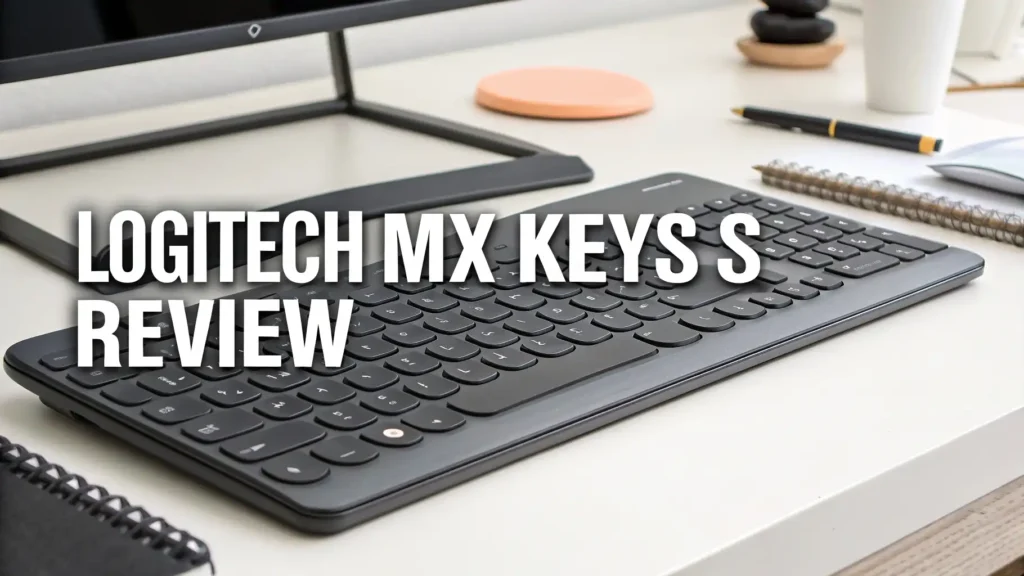
The keyboard comes in two color options. You can choose between Graphite (dark gray) and Pale Grey (light gray). Both colors feature a matte finish that resists fingerprints and looks professional in any office setting. The MX Keys S measures 430mm in width and 131mm in depth. It weighs approximately 810 grams, giving it a solid and premium feel on your desk.
One of the standout features is the low-profile design. The keyboard sits at a comfortable angle without needing flip-out feet. This natural typing angle reduces wrist strain during extended typing sessions. The keys themselves use scissor switches rather than mechanical switches. This design choice creates a quiet typing experience that won’t disturb colleagues in shared workspaces.
Design and Build Quality That Impresses
Build quality stands as one of the strongest points of the MX Keys S. The keyboard features an aluminum top plate that provides exceptional rigidity. When you pick up this keyboard, you immediately notice the premium construction. There is no flex or creaking when you apply pressure to different areas of the keyboard.
The base uses high-quality plastic materials. Logitech incorporated 22% post-consumer recycled plastic into the construction, making this a more environmentally conscious choice. The plastic feels dense and durable, not cheap or hollow like budget keyboards. The rubber feet on the bottom keep the keyboard firmly in place on your desk surface.
The keycaps deserve special mention. Each key features a spherical dish shape that matches the natural curvature of your fingertips. This design element is not just aesthetic. It actually improves typing accuracy because your fingers naturally find the center of each key. The keycaps use a matte coating that feels smooth but not slippery.
Typing Experience: Comfort Meets Performance
The typing experience on the MX Keys S truly sets it apart from competitors. The scissor-switch mechanism provides 1.8mm of key travel with a smooth and consistent actuation. The keys require minimal force to press, reducing finger fatigue during long typing sessions. Each keystroke feels deliberate and satisfying without being loud.
Many reviewers describe the typing feel as “laptop-like” but in the best possible way. The keys do not feel mushy or imprecise like cheaper scissor-switch keyboards. Instead, they offer a crisp tactile response that lets you know when you have successfully pressed a key. Touch typists will appreciate the consistent feel across all keys on the keyboard.
The concave keycap design makes a significant difference in typing accuracy. Your fingers naturally rest in the center of each key. This reduces the chance of accidentally hitting adjacent keys. After a few days of use, most people find their typing speed increases and error rate decreases compared to flat-key keyboards.
Top 3 Alternatives for Logitech MX Keys S


Smart Backlighting and Illumination Features
The automatic backlighting system represents one of the most practical features of the MX Keys S. Built-in proximity sensors detect when your hands approach the keyboard. The backlighting turns on automatically before your fingers even touch the keys. When you move your hands away, the lights turn off after a few seconds to conserve battery power.
The brightness adjustment happens automatically based on ambient lighting conditions. In a bright room, the backlighting may dim or turn off completely because you do not need it. When you work in a darker environment, the backlighting increases to make the keys clearly visible. This intelligent system works seamlessly without requiring manual adjustments.
You can also customize the backlighting behavior through the Logi Options+ software. The software allows you to set specific brightness levels, adjust the timeout duration, or disable the automatic features entirely. Some users prefer to manually control the backlighting based on personal preference rather than relying on the sensors.
Multi-Device Connectivity and Switching
Connectivity options provide excellent flexibility for modern workflows. The MX Keys S supports connection through Bluetooth or the included Logi BOLT USB receiver. The Logi BOLT receiver offers a more stable connection compared to the older Unifying receiver used in the original MX Keys. The BOLT technology provides faster data transmission and better interference resistance in crowded wireless environments.
You can pair the keyboard with up to three devices simultaneously. Dedicated buttons along the top of the keyboard allow instant switching between connected devices. Press button 1 to switch to your desktop computer, button 2 for your laptop, and button 3 for your tablet or phone. The switching happens almost instantaneously without any lag or delay.
This multi-device capability transforms the way you work across platforms. Imagine typing an email on your computer, then pressing a button to switch to your tablet to take notes, then switching to your phone to respond to messages. The seamless transitions eliminate the need to keep multiple keyboards on your desk or constantly disconnect and reconnect devices.
Battery Life and Charging Performance
Battery performance on the MX Keys S meets expectations for a feature-rich wireless keyboard. The built-in 1500mAh rechargeable lithium-ion battery powers the keyboard through multiple workdays. With backlighting enabled and using automatic brightness adjustment, most users get between 8 to 12 days of battery life depending on usage patterns.
If you primarily work in well-lit environments and keep the backlighting disabled, the battery life extends dramatically. Logitech claims up to 5 months of use without backlighting, which testing confirms is accurate for typical eight-hour work days. This extended battery life means you can essentially forget about charging for weeks at a time.
The keyboard charges via a USB-C port located on the top edge. This modern charging standard is convenient because you can use the same cable that charges many smartphones, tablets, and laptops. A full charge from empty takes approximately 3 hours when connected to a standard USB power adapter. You can continue using the keyboard while it charges via the included USB-C to USB-A cable.
Logi Options+ Software and Customization
The Logi Options+ application unlocks the full potential of the MX Keys S. This free software works on Windows and macOS computers. The intuitive interface makes customizing keyboard settings straightforward even for non-technical users. You can remap keys, create custom shortcuts, and configure application-specific settings.
The Smart Actions feature lets you automate repetitive tasks with a single button press. You can create custom macros that perform multiple actions in sequence. For example, you might create a Smart Action that opens your email application, starts a new message, and inserts a template signature. These automation capabilities significantly boost productivity for users who perform the same tasks frequently.
Each function key (F1 through F12) can be customized with application-specific functions. The keyboard recognizes which application is currently active and automatically switches to the appropriate key assignments. You might configure the F5 key to refresh in your web browser, but start a presentation in PowerPoint, and compile code in your development environment.
Compatibility Across Devices and Operating Systems
Universal compatibility stands as a major strength of the MX Keys S. The keyboard works flawlessly with Windows PCs, Mac computers, Linux systems, Chrome OS devices, iPads, Android tablets, and even smartphones. This cross-platform support makes it an excellent choice for users who work across different ecosystems.
When you connect to a Mac, the keyboard automatically switches to Mac-specific key layouts. The Command and Option keys function exactly as expected without requiring manual configuration. Windows users get Windows-specific keys in the appropriate positions. This automatic adaptation eliminates confusion when switching between different operating systems.
The keyboard includes dedicated keys for both operating systems. You will find both Windows and Mac modifier keys printed on the keycaps. This dual labeling helps when you use the keyboard across multiple platforms. The physical layout remains consistent, but the software intelligently maps the keys to match each operating system’s conventions.
Programmable Keys and Productivity Features
The MX Keys S includes several dedicated function keys designed to enhance productivity. Along the top row, you find keys for dictation, emoji input, screenshot capture, and microphone mute. These dedicated buttons provide one-touch access to frequently used functions without remembering complex keyboard shortcuts.
The dictation key activates voice-to-text input across applications. This feature proves especially useful when writing long documents or responding to lengthy emails. You can seamlessly switch between typing and dictating without touching your mouse. The accuracy depends on your operating system’s built-in speech recognition, but the convenient access makes it more likely you will use this time-saving feature.
An emoji key opens the emoji picker on supported operating systems. Rather than searching through menus or remembering obscure keyboard shortcuts, you press one button to access the full emoji library. This makes inserting emojis into messages, social media posts, or documents quick and effortless.
Comparison With Original MX Keys
Understanding the differences between the MX Keys S and the original MX Keys helps determine if upgrading makes sense. The most significant change involves the wireless receiver technology. The MX Keys S uses the newer Logi BOLT receiver instead of the Unifying receiver. BOLT provides improved security, faster connection speeds, and better interference resistance in wireless-heavy environments.
The function key layout changed slightly between models. The MX Keys S includes dedicated keys for dictation, emojis, and microphone mute that replace some of the media control keys from the original. This shift reflects changing priorities as video calls and voice input become more common in daily workflows. Traditional media controls still exist but require using function key combinations.
Sustainability improvements mark another difference. The MX Keys S incorporates more recycled plastic in its construction compared to the original model. The packaging also uses less plastic and more recyclable cardboard materials. For environmentally conscious buyers, these improvements represent progress toward more responsible manufacturing practices.
Price, Value, and Where to Buy
The Logitech MX Keys S typically retails for around $99 to $119 depending on current promotions and retailer pricing. This positions it in the premium keyboard category but below ultra-high-end mechanical keyboards that cost $200 or more. The price reflects the quality construction, advanced features, and reliable performance you receive.
Compared to other premium wireless keyboards, the MX Keys S offers excellent value. It costs less than the Apple Magic Keyboard with Touch ID and provides more features. It competes directly with premium offerings from brands like Microsoft and Keychron while offering better software support and broader device compatibility. The long battery life and durable construction mean this keyboard should last for years, improving the long-term value proposition.
You can purchase the MX Keys S from multiple retailers. Amazon offers competitive pricing and fast shipping for Prime members. The official Logitech website sometimes runs promotions or bundles that include the MX Master 3S mouse at a discounted combined price. Major electronics retailers like Best Buy stock the keyboard and allow in-store pickup if you want to see it in person before buying.
Who Should Buy the Logitech MX Keys S
The MX Keys S serves several specific user groups particularly well. Office professionals who spend most of their day typing documents, emails, and spreadsheets will appreciate the comfortable typing experience and quiet operation. The premium build quality and professional appearance make it suitable for corporate environments where aesthetics matter.
Remote workers and freelancers benefit from the multi-device connectivity. The ability to seamlessly switch between a desktop computer, laptop, and tablet matches modern flexible work styles. The reliable wireless connection ensures you can position the keyboard anywhere on your desk without cable management concerns. The quiet typing won’t disturb others during video calls or when working from shared spaces.
Content creators and writers will find the MX Keys S ideal for extended writing sessions. The comfortable key feel reduces finger fatigue during long writing projects. The programmable keys and Smart Actions can automate repetitive formatting tasks. The accurate typing experience helps maintain flow and reduces the time spent correcting typos.
Potential Drawbacks and Considerations
No keyboard is perfect for everyone. The MX Keys S has some limitations worth considering. The battery life with backlighting is shorter than some competitors. Ten days between charges means you need to develop a regular charging routine. Users who travel frequently might find this inconvenient compared to keyboards that last several months per charge.
The membrane-scissor switches will not satisfy mechanical keyboard enthusiasts. If you prefer the distinct tactile feedback and audible click of mechanical switches, the MX Keys S will feel too soft and muted. The typing experience excels within its category but cannot replicate the characteristics that mechanical keyboard fans love.
The keyboard lacks dedicated macro keys beyond the programmable function keys. Power users who rely on complex macros for gaming or professional applications might find the customization options limited compared to specialized macro keyboards. The Smart Actions feature helps but cannot replace dedicated macro keys for certain workflows.
Frequently Asked Questions
How long does the Logitech MX Keys S battery last?
The battery lasts approximately 10 days with backlighting enabled or up to 5 months with backlighting turned off. The actual battery life varies based on usage patterns and brightness settings. The keyboard charges fully in about 3 hours via USB-C cable. You can continue using the keyboard while it charges.
Can the MX Keys S connect to multiple devices simultaneously?
Yes, the keyboard can pair with up to three devices at the same time. You can quickly switch between connected devices using the dedicated Easy-Switch buttons along the top edge. The keyboard remembers your paired devices and reconnects automatically when you switch to them.
Is the Logitech MX Keys S compatible with Mac computers?
The MX Keys S works perfectly with Mac computers. The keyboard automatically detects when connected to macOS and maps the keys appropriately. Command, Option, and Control keys function exactly as expected. The Logi Options+ software for Mac allows full customization of keyboard settings and Smart Actions.
Does the MX Keys S work with iPads and tablets?
Yes, the keyboard connects to iPads and tablets via Bluetooth. It works with iOS, iPadOS, and Android devices. The keyboard provides a much better typing experience than touchscreen keyboards, making it excellent for productivity